Air Quality Sensor HOWTO
Contents
Parts needed
- ESP8266 Microcontroller
- SSD1306 OLED Display
- MQ135 Gas Sensor for Air Quality
Construction
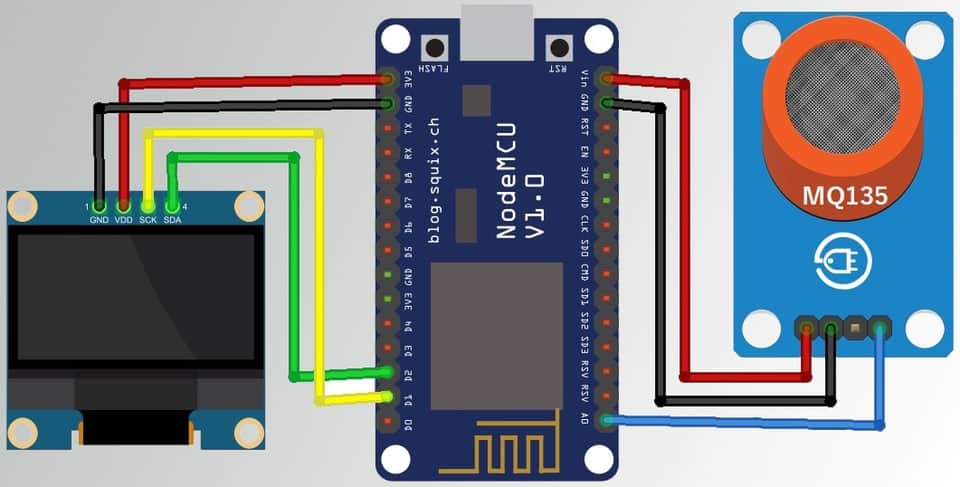
Code
main.py
"""
Simple SSD1306 test for ESP8266 (MicroPython).
Defaults are for NodeMCU: SDA=D2(GPIO4), SCL=D1(GPIO5).
Adjust `SDA_PIN` / `SCL_PIN` and `DHT_PIN` if needed.
"""
from machine import Pin, I2C
import time
import ssd1306
from machine import ADC
import socket

# Defaults for many ESP8266 dev boards (NodeMCU)
SDA_PIN = 4
SCL_PIN = 5
WIDTH = 128
HEIGHT = 64
# MQ-135 is an analog gas sensor. Connect its analog output to A0 (ADC0) on ESP8266.
ADC_CHANNEL = 0

def center_x(text, width=WIDTH, char_w=8):
    return max((width - len(text) * char_w)//2, 0)

try:
    i2c = I2C(scl=Pin(SCL_PIN), sda=Pin(SDA_PIN), freq=400000)
except Exception as e:
    print('I2C init error:', e)
    raise

# i2c.scan() available for debugging; suppressed in normal run

oled = ssd1306.SSD1306_I2C(WIDTH, HEIGHT, i2c)
# OLED initialized (debug prints suppressed)

# initialize ADC (A0)
adc = ADC(ADC_CHANNEL)

# --- Prometheus exporter setup (non-blocking) ---
PORT = 5435
try:
    srv = socket.socket()
    srv.setsockopt(socket.SOL_SOCKET, socket.SO_REUSEADDR, 1)
    srv.bind(('0.0.0.0', PORT))
    srv.listen(1)
    srv.setblocking(False)
    print('Prometheus exporter listening on port', PORT)
except Exception as e:
    srv = None
    print('Failed to start exporter:', e)

def aq_label(adc_val):
    # Simple, non-calibrated label for quick feedback (tune thresholds as needed)
    if adc_val < 100:
        return 'Good'
    if adc_val < 300:
        return 'Moderate'
    if adc_val < 700:
        return 'Unhealthy'
    return 'Hazardous'

def show_values(adc_val):
    # ADC on ESP8266 returns 0-1023. Convert to voltage (approx 0-3.3V)
    voltage = adc_val / 1023 * 3.3
    label = aq_label(adc_val)
    oled.fill(0)
    oled.text('MQ-135 (A0)', center_x('MQ-135 (A0)'), 0)
    oled.text('ADC: {:4d}'.format(adc_val), 0, 18)
    oled.text('V: {:.2f} V'.format(voltage), 0, 34)
    oled.text(label, center_x(label), 50)
    oled.show()
    # also output to REPL for logging/debug
    # REPL logging suppressed in production

def metrics_text(adc_val):
    voltage = adc_val / 1023 * 3.3
    label = aq_label(adc_val)
    # prepare quality label gauges: only one level=1, others=0
    levels = ['Good', 'Moderate', 'Unhealthy', 'Hazardous']
    metrics = []
    metrics.append('# HELP mq135_adc Raw ADC reading from MQ-135')
    metrics.append('# TYPE mq135_adc gauge')
    metrics.append('mq135_adc {}'.format(int(adc_val)))
    metrics.append('# HELP mq135_voltage Voltage at ADC pin')
    metrics.append('# TYPE mq135_voltage gauge')
    metrics.append('mq135_voltage {:.3f}'.format(voltage))
    metrics.append('# HELP mq135_quality One-hot quality indicator labels')
    metrics.append('# TYPE mq135_quality gauge')
    for lv in levels:
        val = 1 if lv == label else 0
        metrics.append('mq135_quality{level="%s"} %d' % (lv, val))
    return '\n'.join(metrics) + '\n'

val = 0
while True:
    try:
        val = adc.read()
        show_values(val)
    except Exception as e:
        oled.fill(0)
        oled.text('ADC read error', 0, 20)
        oled.text('Err', 0, 36)
        oled.show()
    # serve any incoming HTTP requests (non-blocking)
    if srv:
        try:
            cl, remote = srv.accept()
        except Exception:
            cl = None
        if cl:
            try:
                # make client socket operations timeout quickly
                try:
                    cl.settimeout(1.0)
                except Exception:
                    pass
                # read request (ignore contents) up to small limit
                try:
                    _ = cl.recv(512)
                except Exception:
                    pass
                data = metrics_text(val)
                hdr = 'HTTP/1.0 200 OK\r\nContent-Type: text/plain; version=0.0.4\r\nContent-Length: {}\r\n\r\n'.format(len(data))
                payload = hdr + data
                # send in one go if possible
                try:
                    cl.send(payload.encode())
                except Exception:
                    # try chunked send
                    for i in range(0, len(payload), 256):
                        cl.send(payload[i:i+256].encode())
            except Exception:
                # exporter errors suppressed
                pass
            try:
                cl.close()
            except Exception:
                pass
    time.sleep(1)
ssd1306.py
# MicroPython SSD1306 OLED driver (I2C)
# Minimal, compatible with ESP8266/ESP32 MicroPython builds.
from micropython import const
import framebuf

SET_CONTRAST = const(0x81)
DISPLAY_ALL_ON_RESUME = const(0xA4)
DISPLAY_ALL_ON = const(0xA5)
NORMAL_DISPLAY = const(0xA6)
INVERT_DISPLAY = const(0xA7)
DISPLAY_OFF = const(0xAE)
DISPLAY_ON = const(0xAF)

SET_DISPLAY_OFFSET = const(0xD3)
SET_COMPINS = const(0xDA)
SET_VCOM_DETECT = const(0xDB)
SET_DISPLAY_CLOCK_DIV = const(0xD5)
SET_PRECHARGE = const(0xD9)
SET_MULTIPLEX = const(0xA8)
SET_LOWCOLUMN = const(0x00)
SET_HIGHCOLUMN = const(0x10)
SET_STARTLINE = const(0x40)

MEMORY_MODE = const(0x20)
SEG_REMAP = const(0xA0)
COM_SCAN_DEC = const(0xC8)
COM_SCAN_INC = const(0xC0)
CHARGE_PUMP = const(0x8D)


class SSD1306:
    def __init__(self, width, height, external_vcc):
        self.width = width
        self.height = height
        self.external_vcc = external_vcc
        self.pages = self.height // 8
        self.buffer = bytearray(self.pages * self.width)
        self.framebuf = framebuf.FrameBuffer(self.buffer, self.width, self.height, framebuf.MONO_VLSB)

    def poweroff(self):
        self.write_cmd(DISPLAY_OFF)

    def poweron(self):
        self.write_cmd(DISPLAY_ON)

    def contrast(self, contrast):
        self.write_cmd(SET_CONTRAST)
        self.write_cmd(contrast)

    def invert(self, invert):
        self.write_cmd(INVERT_DISPLAY if invert else NORMAL_DISPLAY)

    def show(self):
        for page in range(0, self.pages):
            self.write_cmd(0xB0 | page)
            self.write_cmd(SET_LOWCOLUMN | 0x00)
            self.write_cmd(SET_HIGHCOLUMN | 0x00)
            start = self.width * page
            end = start + self.width
            self.write_data(self.buffer[start:end])

    def fill(self, col):
        self.framebuf.fill(col)

    def pixel(self, x, y, col):
        self.framebuf.pixel(x, y, col)

    def text(self, string, x, y, col=1):
        self.framebuf.text(string, x, y, col)


class SSD1306_I2C(SSD1306):
    def __init__(self, width, height, i2c, addr=0x3c, external_vcc=False):
        self.i2c = i2c
        self.addr = addr
        super().__init__(width, height, external_vcc)
        self.init_display()

    def write_cmd(self, cmd):
        # control byte 0x00 for single commands (Co=0, D/C#=0)
        self.i2c.writeto(self.addr, bytearray([0x00, cmd]))

    def write_data(self, buf):
        # prepend control byte 0x40 for data (Co=0, D/C#=1)
        # chunk writes to avoid large single I2C transactions
        for i in range(0, len(buf), 16):
            chunk = buf[i:i+16]
            self.i2c.writeto(self.addr, b"\x40" + chunk)

    def init_display(self):
        for cmd in (
            DISPLAY_OFF,
            SET_DISPLAY_CLOCK_DIV, 0x80,
            SET_MULTIPLEX, self.height - 1,
            SET_DISPLAY_OFFSET, 0x00,
            SET_STARTLINE | 0x00,
            # enable charge pump when using internal Vcc (external_vcc==False)
            CHARGE_PUMP, 0x14 if not self.external_vcc else 0x10,
            MEMORY_MODE, 0x00,
            SEG_REMAP | 0x01,
            COM_SCAN_DEC,
            SET_COMPINS, 0x12 if self.height == 32 else 0x12,
            SET_CONTRAST, 0xCF,
            SET_PRECHARGE, 0xF1 if not self.external_vcc else 0x22,
            SET_VCOM_DETECT, 0x40,
            DISPLAY_ALL_ON_RESUME,
            NORMAL_DISPLAY,
            DISPLAY_ON,
        ):
            self.write_cmd(cmd)
Steps to run using Thonny
- Connect your ESP8266 to your computer and open Thonny.
- Select the correct interpreter (MicroPython (ESP8266)).
- Upload these files to the device's root:
ssd1306.pymain.py
In Thonny: open each file, then use "Save as..." -> "Device".
- After uploading, press the green Run button or run in the REPL:
import main
Notes:
- If your board uses different I2C pins, edit main.py to set SDA_PIN and SCL_PIN.
- The driver included (ssd1306.py) is a small I2C implementation compatible with common MicroPython builds.
- If you prefer immediate REPL testing, try:
from machine import Pin, I2C
import ssd1306
i2c = I2C(scl=Pin(5), sda=Pin(4))
oled = ssd1306.SSD1306_I2C(128, 64, i2c)
oled.fill(0)
oled.text('Hello', 0, 0)
oled.show()
Change history (8) — View full history
-
2025-12-21 19:54 UTCedit — jake
-
2025-12-21 19:53 UTCedit — jake
-
2025-12-21 19:52 UTCedit — jake
-
2025-12-21 19:49 UTCedit — jake
-
2025-12-21 19:47 UTCedit — jake
-
2025-12-21 19:46 UTCedit — jake
-
2025-12-21 19:46 UTCedit — jake
-
2025-12-21 19:46 UTCcreate — jake